<?xml version="1.0" encoding="utf-8"?><feed xmlns="http://www.w3.org/2005/Atom" ><generator uri="https://jekyllrb.com/" version="3.10.0">Jekyll</generator><link href="https://remy.duthu.org/feed.xml" rel="self" type="application/atom+xml" /><link href="https://remy.duthu.org/" rel="alternate" type="text/html" /><updated>2026-03-15T11:38:29+00:00</updated><id>https://remy.duthu.org/feed.xml</id><title type="html">Rémy Duthu</title><subtitle>Personal site of Rémy Duthu</subtitle><author><name>Rémy Duthu</name></author><entry><title type="html">How I Work With Parallel Agents</title><link href="https://remy.duthu.org/2026/03/13/how-i-work-with-parallel-agents.html" rel="alternate" type="text/html" title="How I Work With Parallel Agents" /><published>2026-03-13T00:00:00+00:00</published><updated>2026-03-13T00:00:00+00:00</updated><id>https://remy.duthu.org/2026/03/13/how-i-work-with-parallel-agents</id><content type="html" xml:base="https://remy.duthu.org/2026/03/13/how-i-work-with-parallel-agents.html"><![CDATA[<p>For years, I optimized for flow. Long, uninterrupted blocks where I could hold an entire problem in my head, move from A to B without touching C or D. I read the deep work literature, silenced notifications, closed Slack. It worked.</p>

<p>Coding agents changed the equation. Not because they replaced the thinking, but because they introduced idle time in the middle of it. When you ask <a href="https://docs.anthropic.com/en/docs/claude-code/overview">Claude Code</a> to implement a feature, you don’t sit there watching it write files and run tests. You could, but it would be a waste. The agent might run autonomously for hours, and during that window you have a choice: do something else with your hands, or do something else with another agent.</p>

<p>Ethan Swan <a href="https://ethanswan.com/feed/2026/02/07/context-switching-is-everything-now/">recently argued</a> that context switching between multiple AI sessions is becoming a core engineering skill, that it’s “about to become table stakes.” Addy Osmani <a href="https://addyosmani.com/blog/ai-coding-workflow/">takes a more cautious view</a>, sticking to one coding agent at a time and treating the AI as a pair programmer that needs constant direction. I’ve landed somewhere between the two. Running agents in parallel is genuinely productive, but there’s a ceiling, and it’s lower than I’d expect.</p>

<h2 id="how-i-work-with-agents">How I work with agents</h2>

<p>I typically run at most two <em>main</em> agents in parallel. <em>Main</em> meaning agents working on substantial features, not quick chores. Each gets its own <a href="https://git-scm.com/docs/git-worktree">git worktree</a> so they don’t step on each other’s files, and I keep the primary repository checkout free for my own manual work. I wrote a small <a href="https://github.com/remyduthu/dotfiles/blob/main/modules/git/bin/git-worktree-init"><code class="language-plaintext highlighter-rouge">git-worktree-init</code></a> script that scaffolds two worktrees (<code class="language-plaintext highlighter-rouge">{repo}-1</code> and <code class="language-plaintext highlighter-rouge">{repo}-2</code>) inside a <code class="language-plaintext highlighter-rouge">.worktrees/</code> directory at the repo root, each on its own branch. A <a href="https://github.com/remyduthu/dotfiles/blob/main/modules/git/.gitignore">global <code class="language-plaintext highlighter-rouge">.gitignore</code></a> keeps those directories out of version control.</p>

<p>In my <a href="https://iterm2.com/">iTerm2</a> setup, the first two tabs are Claude Code sessions and the rest are mine. To keep track of what each agent is doing at a glance, I use <a href="https://docs.anthropic.com/en/docs/claude-code/hooks">Claude Code hooks</a> to <a href="https://github.com/remyduthu/dotfiles/blob/main/modules/claude/hooks/iterm-tab-color.sh">color each tab</a> based on the agent’s state. Adding even one more agent beyond two noticeably increases the cognitive load for me. Not linearly, but in a way that feels closer to what managers describe when they talk about <a href="https://en.wikipedia.org/wiki/Span_of_control">the cost of each additional direct report</a>.</p>

<p>Delegating the main development work to agents doesn’t mean I stop writing code. I still enjoy it, and there are things I want to learn by doing rather than delegating. What changes is that I get to choose. I can pick up a small technical task on the side, design future systems, review more PRs, or I can step back entirely and spend that time on things that usually get squeezed out: reading technical material, studying a new tool, thinking about architecture. The agents handle the bulk of the implementation and I get space for the higher level work.</p>

<p>The key to making this work for me, and to not spending the whole day babysitting, is front-loading the planning. I use Claude Code’s <a href="https://docs.anthropic.com/en/docs/claude-code/agentic-coding#plan-mode">Plan Mode</a> extensively before letting an agent start writing code. My <a href="https://github.com/remyduthu/dotfiles/blob/main/modules/claude/settings.json">Claude Code settings</a> default to plan mode so every session starts with planning, not coding. A good plan means I can trust the agent to run autonomously for a long stretch, which is what buys me time to focus on other things. I also ask agents to split their work into minimal, individually deployable commits, each one safe to ship on its own. This aligns well with how we work at Mergify, where every commit is pushed as its own PR using <a href="https://github.com/Mergifyio/mergify-cli"><code class="language-plaintext highlighter-rouge">mergify stack</code></a> and deployed independently.</p>

<p>Planning often starts before I even open Claude Code. I use <a href="https://linear.app/">Linear</a> for issue tracking, and with the <a href="https://linear.app/agents">Linear MCP server</a> connected, I can tell an agent “write a plan to tackle MRGFY-1234” and it pulls in the issue context, understands the scope, and proposes an implementation strategy. Linear also supports <a href="https://linear.app/agents">delegating issues directly to coding agents</a>, which closes the loop even further.</p>

<p>On our codebase, we’ve invested in making the agent as autonomous as possible. We documented conventions, testing commands, and dangerous patterns to avoid. We’ve also written custom <a href="https://docs.anthropic.com/en/docs/claude-code/skills">skills</a> that the agent can invoke to run database migrations safely, query production data, migrating between test frameworks, etc. The Claude Code <a href="https://github.com/remyduthu/dotfiles/blob/main/modules/claude/settings.json">permissions</a> are tuned to pre-approve safe operations (<code class="language-plaintext highlighter-rouge">git add</code>, <code class="language-plaintext highlighter-rouge">git commit</code>, <code class="language-plaintext highlighter-rouge">grep</code>, <code class="language-plaintext highlighter-rouge">mergify</code>, etc.) while still requiring confirmation for <code class="language-plaintext highlighter-rouge">git push</code>. The result is that the agent can write code, run tests, generate SQL migrations, compare SQL optimisations, build OpenAPI schemas, and push a stack of commits, all without asking me anything.</p>

<h2 id="what-changes-downstream">What changes downstream</h2>

<p>Once the agent finishes, it pushes its work and I get a set of PRs to review. I review them on GitHub alongside my colleagues, and alongside other automated reviewers like <a href="https://docs.github.com/en/copilot/how-tos/use-copilot-agents/request-a-code-review/use-code-review">GitHub Copilot code review</a>. When reviewers leave comments, I can point Claude Code at the PR and ask it to address all open threads. We wrote a small internal skill to streamline that step.</p>

<p>This workflow produces more PRs than a traditional one, which has shifted where the bottleneck sits. Review throughput has become a real constraint. We’re still figuring out the right approach. One thing we’ve tried at Mergify is a “low-impact” label that reviewers can apply to acknowledge that a PR is safe enough to merge with a single approval rather than the usual two. It’s a small process change, but it reflects a broader tension: agent-assisted development generates more incremental, well-scoped changes, and the review process hasn’t fully adapted to that cadence yet. We’ll keep iterating on this.</p>

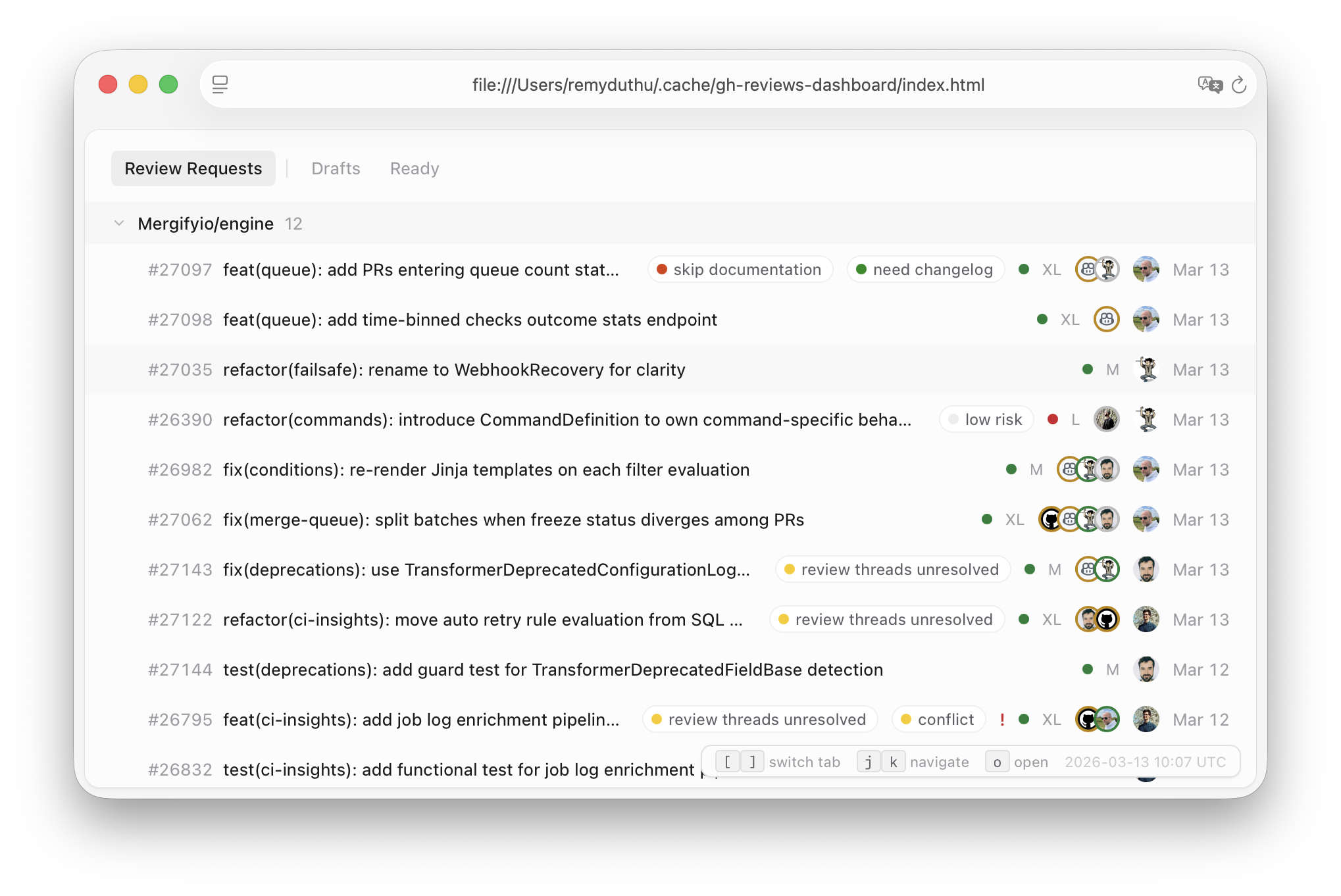
<p>To stay on top of the review load, I asked Claude Code to build two GitHub CLI extensions: <a href="https://github.com/remyduthu/dotfiles/blob/main/modules/gh/bin/gh-reviews"><code class="language-plaintext highlighter-rouge">gh-reviews</code></a>, which lists open PRs requesting my review directly in the terminal, and <a href="https://github.com/remyduthu/dotfiles/blob/main/modules/gh/bin/gh-reviews-dashboard"><code class="language-plaintext highlighter-rouge">gh-reviews-dashboard</code></a>, which generates an HTML dashboard with CI status, reviewer avatars, and keyboard navigation.</p>

<p><img src="/assets/images/gh-reviews-dashboard.png" alt="gh-reviews-dashboard" /></p>

<p>I don’t think this way of working is for everyone, or for every task, and it’ll probably still change a lot in the future. Some problems still reward, maybe even require, sustained single-threaded focus. But for the kind of feature work and maintenance that makes up the bulk of a product engineer’s week, learning to manage agents in parallel has been a meaningful shift for me. The skill isn’t prompting anymore. It’s more orchestrating.</p>]]></content><author><name>Rémy Duthu</name></author><category term="ai" /><category term="claude-code" /><category term="developer-experience" /><category term="workflow" /><summary type="html"><![CDATA[How I run two Claude Code agents in parallel using git worktrees, plan mode, and custom hooks — and what changes downstream when agents do the bulk of the implementation.]]></summary><media:thumbnail xmlns:media="http://search.yahoo.com/mrss/" url="https://remy.duthu.org/assets/images/og/default.png" /><media:content medium="image" url="https://remy.duthu.org/assets/images/og/default.png" xmlns:media="http://search.yahoo.com/mrss/" /></entry><entry><title type="html">What Go Taught Me About Writing Python</title><link href="https://remy.duthu.org/2026/01/29/what-go-taught-me-about-writing-python.html" rel="alternate" type="text/html" title="What Go Taught Me About Writing Python" /><published>2026-01-29T00:00:00+00:00</published><updated>2026-01-29T00:00:00+00:00</updated><id>https://remy.duthu.org/2026/01/29/what-go-taught-me-about-writing-python</id><content type="html" xml:base="https://remy.duthu.org/2026/01/29/what-go-taught-me-about-writing-python.html"><![CDATA[<p>Six months ago, I stopped writing Go every day and started shipping Python to production.</p>

<p>Before joining Mergify, I spent a few years working primarily in Go. Backend services, APIs, systems where performance and correctness mattered. At Mergify, Python was the language in production.</p>

<p>This post is a reflection on <strong>developer experience</strong> after six months of real-world Python usage, seen through the lens of someone shaped by Go. I’m focusing on web apps, tooling, testing, and shipping code.</p>

<h2 id="shipping-speed-python-is-relentlessly-fast">Shipping Speed: Python Is Relentlessly Fast</h2>

<p>The first thing that surprised me was <strong>how fast you can build things in Python</strong>.</p>

<p>Spinning up an API, wiring a service, gluing components together: it all feels immediate. There’s very little friction between “I have an idea” and “it’s running locally.” In Go, I spent more time upfront designing types, interfaces, and data flows before seeing anything work.</p>

<p>Python flips that order. You build first, shape later.</p>

<p>This makes experimentation cheap. You try things you might not bother with in a more rigid environment. But it also sets the tone for everything that follows: Python optimizes for velocity, not enforcement.</p>

<p>Go optimizes for correctness from the start. You pay the cost early, but you rarely wonder later what a piece of code is supposed to do.</p>

<h2 id="typing-go-still-lives-in-my-head">Typing: Go Still Lives in My Head</h2>

<p>If there’s one thing Go permanently changed in how I write code, it’s <strong>typing</strong>. Not typing as a safety net, but typing as a <strong>design tool</strong>.</p>

<p>Writing Go for years trained me to think carefully about what objects exist in the system, how they’re named, what data flows between layers, and where responsibilities start and stop. That mindset carried over directly to Python.</p>

<p>Python’s typing is optional, porous, and negotiable. Even with strict settings and an army of linters, you can always fall back to <code class="language-plaintext highlighter-rouge">typing.Any</code>. In practice, you sometimes do, especially at boundaries:</p>

<div class="language-python highlighter-rouge"><div class="highlight"><pre class="highlight"><code><span class="kn">import</span> <span class="nn">typing</span>

<span class="k">def</span> <span class="nf">make_sql_statement</span><span class="p">()</span> <span class="o">-&gt;</span> <span class="n">sqlalchemy</span><span class="p">.</span><span class="n">Select</span><span class="p">[</span><span class="nb">tuple</span><span class="p">[</span><span class="n">typing</span><span class="p">.</span><span class="n">Any</span><span class="p">,</span> <span class="p">...]]:</span>
    <span class="p">...</span>
</code></pre></div></div>

<p>This starts as a pragmatic choice and slowly spreads. Dictionaries become the norm. Shapes are implicit. The compiler stops being a design partner and becomes a suggestion engine.</p>

<p>The most painful part is <strong>external libraries</strong>. Many popular Python libraries are poorly typed, or not typed at all. Combined with sparse documentation, this often leads to reverse-engineering: reading source code, stepping through functions, or adding print statements just to understand what’s going on.</p>

<p>In Go, you fight the compiler. In Python, you sometimes fight reality.</p>

<blockquote>
  <p>Python doesn’t prevent bad modeling. It just makes it easier to postpone it.</p>
</blockquote>

<p>If you bring Go’s discipline with you, Python’s flexibility is powerful. If you don’t, things get fuzzy fast.</p>

<h2 id="writing-code-faster-in-python-easier-in-go">Writing Code: Faster in Python, Easier in Go</h2>

<p>One sentence kept coming back to me over these six months:</p>

<blockquote>
  <p>It’s faster to write Python, but it’s easier to write Go.</p>
</blockquote>

<p>Python has more concepts, more magic, more ways to express the same idea. Decorators, context managers, dynamic attributes, metaclasses, magic methods. There’s a lot going on.</p>

<p>Go keeps the surface area intentionally small. Fewer concepts, fewer surprises, fewer ways to do the same thing.</p>

<p>This shows up when mapping data between layers. In Go, if you want clean separation between an API layer and a domain layer, you write explicit mapping code:</p>

<div class="language-go highlighter-rouge"><div class="highlight"><pre class="highlight"><code><span class="k">func</span> <span class="n">NewUser</span><span class="p">(</span><span class="n">model</span> <span class="n">UserModel</span><span class="p">)</span> <span class="n">User</span> <span class="p">{</span>
    <span class="k">return</span> <span class="n">User</span><span class="p">{</span>
        <span class="n">ID</span><span class="o">:</span>    <span class="n">model</span><span class="o">.</span><span class="n">ID</span><span class="p">,</span>
        <span class="n">Name</span><span class="o">:</span>  <span class="n">model</span><span class="o">.</span><span class="n">Name</span><span class="p">,</span>
        <span class="n">Email</span><span class="o">:</span> <span class="n">model</span><span class="o">.</span><span class="n">Email</span><span class="p">,</span>
    <span class="p">}</span>
<span class="p">}</span>
</code></pre></div></div>

<p>It’s verbose. It feels like boilerplate. You even end up writing a bunch of tests just to make sure all your fields are properly passed from one type to another. But it’s explicit and quite easy to reason about.</p>

<p>In Python, the same thing might look like:</p>

<div class="language-python highlighter-rouge"><div class="highlight"><pre class="highlight"><code><span class="o">@</span><span class="n">dataclasses</span><span class="p">.</span><span class="n">dataclass</span>
<span class="k">class</span> <span class="nc">User</span><span class="p">:</span>
    <span class="nb">id</span><span class="p">:</span> <span class="nb">str</span>
    <span class="n">name</span><span class="p">:</span> <span class="nb">str</span>
    <span class="n">email</span><span class="p">:</span> <span class="nb">str</span>

<span class="n">user</span> <span class="o">=</span> <span class="n">User</span><span class="p">(</span><span class="o">**</span><span class="n">model</span><span class="p">)</span>
</code></pre></div></div>

<p>That conciseness is fantastic. But it hides assumptions. If the shape changes, you’ll find out later. Often in tests, sometimes in production.</p>

<p>Python feels liberating; Go feels grounding.</p>

<h2 id="tooling-philosophy-centralized-vs-community-driven">Tooling Philosophy: Centralized vs Community-Driven</h2>

<p>One of the bigger cultural shifts for me was tooling.</p>

<p>Go’s tooling philosophy is clear: most things come with the language. You install Go, install the official IDE extension, and you’re productive. Formatting, testing, linting all work out of the box.</p>

<p>Python’s tooling is community-driven. That’s both its strength and its weakness.</p>

<p>On one hand, you get incredible innovation: FastAPI, pytest, uv, poetry, mypy, ruff. On the other hand, you spend real time understanding the stack. FastAPI is built on Starlette, which relies on… wait, where does this error come from?</p>

<p>There’s also no single standard. It’s easy for your IDE setup to drift from your CI setup. If you’re using pytest with uv, poe, multiple linters, and custom scripts, you have to work to ensure your local feedback matches reality.</p>

<p>In Go, IDE ≈ CI by default. In Python, this gap is shrinking, but it’s still noticeable.</p>

<h2 id="testing-weird-at-first-then-powerful">Testing: Weird at First, Then Powerful</h2>

<p>Testing is where Python won me over.</p>

<p>At first, it felt uncomfortable. You don’t get all the same IDE features you’re used to in Go. Fewer guarantees, fewer compile-time signals. But once properly configured, pytest is powerful.</p>

<p>I spent several months working on a pytest plugin, which forced me to dig into its internals. The framework follows a Unix-like philosophy: small hooks, clear inputs and outputs, composability everywhere.</p>

<p>That’s why the ecosystem is so strong. You get plugins for parallel execution, coverage, test splitting, selective execution, and flaky test handling.</p>

<p>The one thing I still miss is Go’s table-driven tests:</p>

<div class="language-go highlighter-rouge"><div class="highlight"><pre class="highlight"><code><span class="n">tests</span> <span class="o">:=</span> <span class="k">map</span><span class="p">[</span><span class="kt">string</span><span class="p">]</span><span class="k">struct</span><span class="p">{</span>
    <span class="n">input</span><span class="p">,</span> <span class="n">want</span> <span class="kt">string</span>
<span class="p">}{</span>
    <span class="s">"test case 1"</span><span class="o">:</span> <span class="p">{</span><span class="n">input</span><span class="o">:</span> <span class="s">"foo"</span><span class="p">,</span> <span class="n">want</span><span class="o">:</span> <span class="s">"bar"</span><span class="p">},</span>
    <span class="s">"test case 2"</span><span class="o">:</span> <span class="p">{</span><span class="n">input</span><span class="o">:</span> <span class="s">"baz"</span><span class="p">,</span> <span class="n">want</span><span class="o">:</span> <span class="s">"qux"</span><span class="p">},</span>
<span class="p">}</span>
<span class="k">for</span> <span class="n">name</span><span class="p">,</span> <span class="n">tt</span> <span class="o">:=</span> <span class="k">range</span> <span class="n">tests</span> <span class="p">{</span>
    <span class="n">t</span><span class="o">.</span><span class="n">Run</span><span class="p">(</span><span class="n">name</span><span class="p">,</span> <span class="k">func</span><span class="p">(</span><span class="n">t</span> <span class="o">*</span><span class="n">testing</span><span class="o">.</span><span class="n">T</span><span class="p">)</span> <span class="p">{</span>
        <span class="o">...</span>
    <span class="p">})</span>
<span class="p">}</span>
</code></pre></div></div>

<p>I know a lot of people don’t like this method. But I think <a href="https://remy.duthu.org/2025/10/27/dependencies-inputs-outputs.html">it forces you to think about (1.) dependencies, (2.) inputs, and (3.) outputs</a>. They’re explicit, readable, and fully typed. Pytest’s parametrization is powerful, but you lose typing quickly with layered fixtures and indirect dependencies.</p>

<p>Still, for large test suites, Python’s testing ecosystem is world-class.</p>

<h2 id="concurrency-i-dont-miss-goroutines-as-much-as-i-thought">Concurrency: I Don’t Miss Goroutines As Much As I Thought</h2>

<p>I expected to miss <a href="https://go.dev/tour/concurrency/1">goroutines</a> more than I do.</p>

<p>Coming from Go, goroutines feel like a requirement for any modern language. Lightweight concurrency, simple syntax, powerful primitives.</p>

<p>In practice, with a proper queue system and worker model, things work fine. Workers are easier to debug, easier to observe, probably more robust, and easier to reason about than implicit concurrency everywhere. Less magic, more explicit flow.</p>

<h2 id="deployment-go-still-wins">Deployment: Go Still Wins</h2>

<p>Deployment is the one area where Python can’t compete.</p>

<p>A Go service compiled into a single static binary, shipped with <a href="https://docs.docker.com/guides/golang/build-images/#multi-stage-builds">a multi-stage Dockerfile</a> ending in <code class="language-plaintext highlighter-rouge">FROM scratch</code>, is hard to beat. Python images are heavier. They’re acceptable for web apps, but never elegant.</p>

<h2 id="what-changed-how-i-code">What Changed How I Code</h2>

<p>Python didn’t replace Go in my head. I think Go made me a better Python engineer. It taught me to care about boundaries, naming, and data flow, even when the language doesn’t force me to.</p>

<p>Python rewards speed. Go enforces a kind of discipline.</p>

<p>One thing I didn’t cover here is Python’s reach beyond web apps. LLMs, data science, R&amp;D: Python is everywhere. That adoption brings a massive community, and that community is genuinely helpful. Go’s community is great too, but Python’s sheer size means more libraries, more answers, and more people who’ve hit the same problems you have.</p>

<p>After six months, I’m convinced the best results come from combining both: moving fast, but acting as if the compiler were watching, even when it isn’t.</p>]]></content><author><name>Rémy Duthu</name></author><category term="go" /><category term="python" /><category term="developer-experience" /><summary type="html"><![CDATA[Six months after switching from Go to Python in production — a reflection on typing, tooling, testing, and what carries over between languages.]]></summary><media:thumbnail xmlns:media="http://search.yahoo.com/mrss/" url="https://remy.duthu.org/assets/images/og/default.png" /><media:content medium="image" url="https://remy.duthu.org/assets/images/og/default.png" xmlns:media="http://search.yahoo.com/mrss/" /></entry><entry><title type="html">Options Are Not Constraints</title><link href="https://remy.duthu.org/2025/12/05/options-are-not-constraints.html" rel="alternate" type="text/html" title="Options Are Not Constraints" /><published>2025-12-05T00:00:00+00:00</published><updated>2025-12-05T00:00:00+00:00</updated><id>https://remy.duthu.org/2025/12/05/options-are-not-constraints</id><content type="html" xml:base="https://remy.duthu.org/2025/12/05/options-are-not-constraints.html"><![CDATA[<p>This short article is a gentle reminder to myself.
Way too often, I see my options as constraints.</p>

<blockquote>
  <p>Should I go for a run, a hike, climbing? Should I continue this task, start this project, take a break?</p>
</blockquote>

<p>I have to keep in mind that simply having these options is a form of wealth.
Being able to overthink these decisions is an incredibly precious thing.</p>

<p>So, yes, <a href="https://en.wikipedia.org/wiki/Decision_fatigue">decision fatigue</a> is real, and we shouldn’t ignore it.
We should probably even try to reduce the number of decisions we have to make to the bare minimum to be able to stay focused on what matters.</p>

<p>But don’t get me wrong, having no options is also very real, and certainly a bigger problem.</p>

<p>Sometimes, remembering that outside my head there is a concrete world waiting for me to take opportunities without thinking too much is actually pretty nice.</p>

<p>I thought a lot about this after watching <a href="https://youtu.be/CnIfjBTJ5bw?si=XckiYuWfsRBw-Yu6">this video</a> by Josh Romero.</p>]]></content><author><name>Rémy Duthu</name></author><category term="personal" /><summary type="html"><![CDATA[A reminder that having too many choices is a form of wealth, not a burden — and that decision fatigue shouldn't make us forget how lucky we are.]]></summary><media:thumbnail xmlns:media="http://search.yahoo.com/mrss/" url="https://remy.duthu.org/assets/images/og/default.png" /><media:content medium="image" url="https://remy.duthu.org/assets/images/og/default.png" xmlns:media="http://search.yahoo.com/mrss/" /></entry><entry><title type="html">Blogging with Jekyll in 2025</title><link href="https://remy.duthu.org/2025/10/31/blogging-with-jekyll-in-2025.html" rel="alternate" type="text/html" title="Blogging with Jekyll in 2025" /><published>2025-10-31T00:00:00+00:00</published><updated>2025-10-31T00:00:00+00:00</updated><id>https://remy.duthu.org/2025/10/31/blogging-with-jekyll-in-2025</id><content type="html" xml:base="https://remy.duthu.org/2025/10/31/blogging-with-jekyll-in-2025.html"><![CDATA[<p>Wait wait wait I know it’s not flashy.
I decided to start blogging, now… 25 years after everyone else.</p>

<p>I know a blog isn’t exactly an innovative project.
It might even sound boring in the age of AI-generated everything.
But I like it.
Blogging feels personal.
Which by the way is kind of strange, right?
Writing personal things online?
It’s maybe a bit of nostalgia.</p>

<p>This idea has been sitting in my head for a while, but it never felt like the right thing to do.
Probably because, every time I thought about it, I went straight into developer mode:</p>

<blockquote>
  <p>Which tools should I use? What stack? What about the design, the hosting, the automation?</p>
</blockquote>

<p>Basically, everything except the fact that I just wanted to write.</p>

<p>So, a few weeks ago, I decided to build something very minimal.
A simple website, made with very boring tech.
No fancy frameworks, no endless dependencies.</p>

<p>I knew I wanted to keep control of the underlying code (which is available <a href="https://github.com/remyduthu/remy.duthu.org">here</a>) so I didn’t want to use platforms like Medium or Substack for now.
Plus, I have no business goals here.
I just want a space to share thoughts, even if they don’t make sense to anyone but me.</p>

<p>I already had a small website hosted on GitHub Pages, so I started digging around and noticed they natively support Jekyll as a static site generator.
I opened the Jekyll documentation.
It’s short, well-written, and straight to the point.
It just felt right even if it’s Ruby (I know, I know).
It lets me keep control without needing an army of frameworks and build tools, but it still provides enough structure to write without touching raw HTML all the time.</p>

<p>The project was up and running in… what, maybe four hours?
All these years of hesitation, and that was it.</p>

<p>First, I <a href="https://jekyllrb.com/docs/installation/macos/">installed Jekyll</a> locally.
Just make sure to install the latest version of Ruby, not the one bundled with MacOS.</p>

<p>Then, the only slightly tricky part was integrating <a href="https://tailwindcss.com">Tailwind CSS</a>.
To do that, I installed and configured a PostCSS gem called <a href="https://rubygems.org/gems/jekyll-postcss-v2"><code class="language-plaintext highlighter-rouge">jekyll-postcss-v2</code></a>.
The configuration is straightforward:</p>

<div class="language-js highlighter-rouge"><div class="highlight"><pre class="highlight"><code><span class="c1">// postcss.config.js</span>
<span class="nx">module</span><span class="p">.</span><span class="nx">exports</span> <span class="o">=</span> <span class="p">{</span>
  <span class="na">plugins</span><span class="p">:</span> <span class="p">{</span>
    <span class="dl">"</span><span class="s2">@tailwindcss/postcss</span><span class="dl">"</span><span class="p">:</span> <span class="p">{},</span>
  <span class="p">},</span>
<span class="p">};</span>
</code></pre></div></div>

<p>I also needed to add this plugin to my Jekyll configuration file:</p>

<div class="language-yaml highlighter-rouge"><div class="highlight"><pre class="highlight"><code><span class="c1"># _config.yml</span>
<span class="na">plugins</span><span class="pi">:</span>
  <span class="pi">-</span> <span class="s">jekyll-postcss</span>

<span class="na">postcss</span><span class="pi">:</span>
  <span class="na">cache</span><span class="pi">:</span> <span class="no">false</span> <span class="c1"># Use Tailwind CSS JIT engine instead.</span>
</code></pre></div></div>

<p>The next step was to <a href="https://tailwindcss.com/docs/installation/using-postcss">install Tailwind CSS</a> and create its configuration file:</p>

<div class="language-js highlighter-rouge"><div class="highlight"><pre class="highlight"><code><span class="c1">// tailwind.config.js</span>
<span class="nx">module</span><span class="p">.</span><span class="nx">exports</span> <span class="o">=</span> <span class="p">{</span>
  <span class="na">content</span><span class="p">:</span> <span class="p">[</span><span class="dl">"</span><span class="s2">./**/*.html</span><span class="dl">"</span><span class="p">],</span>
  <span class="na">plugins</span><span class="p">:</span> <span class="p">[],</span>
  <span class="na">theme</span><span class="p">:</span> <span class="p">{},</span>
<span class="p">};</span>
</code></pre></div></div>

<p>I can now import the library in my main CSS file with:</p>

<div class="language-css highlighter-rouge"><div class="highlight"><pre class="highlight"><code><span class="k">@import</span> <span class="s1">"tailwindcss"</span><span class="p">;</span>

<span class="nt">h1</span> <span class="p">{</span>
  <span class="c">/* Utility classes and the @apply keywords are available. */</span>
  <span class="err">@apply</span> <span class="err">text-xl;</span>
<span class="p">}</span>
</code></pre></div></div>

<p>The last step was to automate everything with GitHub Actions.
I used <a href="https://jekyllrb.com/docs/continuous-integration/github-actions/">the official template</a> and just added the steps required to install <a href="https://pnpm.io">pnpm</a> dependencies:</p>

<div class="language-yaml highlighter-rouge"><div class="highlight"><pre class="highlight"><code><span class="na">jobs</span><span class="pi">:</span>
  <span class="na">build</span><span class="pi">:</span>
    <span class="na">steps</span><span class="pi">:</span>
      <span class="c1"># ...</span>

      <span class="c1"># https://github.com/marketplace/actions/setup-pnpm#use-cache-to-reduce-installation-time</span>
      <span class="pi">-</span> <span class="na">uses</span><span class="pi">:</span> <span class="s">pnpm/action-setup@v4</span>
        <span class="na">name</span><span class="pi">:</span> <span class="s">Install pnpm</span>
        <span class="na">with</span><span class="pi">:</span>
          <span class="na">run_install</span><span class="pi">:</span> <span class="no">false</span>

      <span class="pi">-</span> <span class="na">name</span><span class="pi">:</span> <span class="s">Install Node.js</span>
        <span class="na">uses</span><span class="pi">:</span> <span class="s">actions/setup-node@v4</span>
        <span class="na">with</span><span class="pi">:</span>
          <span class="na">node-version</span><span class="pi">:</span> <span class="m">22</span>
          <span class="na">cache</span><span class="pi">:</span> <span class="s2">"</span><span class="s">pnpm"</span>

      <span class="pi">-</span> <span class="na">name</span><span class="pi">:</span> <span class="s">Install dependencies</span>
        <span class="na">run</span><span class="pi">:</span> <span class="s">pnpm install</span>

      <span class="pi">-</span> <span class="na">name</span><span class="pi">:</span> <span class="s">Build with Jekyll</span>
        <span class="c1"># Outputs to the './_site' directory by default.</span>
        <span class="na">run</span><span class="pi">:</span> <span class="s">bundle exec jekyll build --baseurl "$"</span>
        <span class="na">env</span><span class="pi">:</span>
          <span class="na">JEKYLL_ENV</span><span class="pi">:</span> <span class="s">production</span>

      <span class="pi">-</span> <span class="na">name</span><span class="pi">:</span> <span class="s">Upload artifact</span>
        <span class="c1"># Automatically uploads an artifact from the './_site' directory by default.</span>
        <span class="na">uses</span><span class="pi">:</span> <span class="s">actions/upload-pages-artifact@v3</span>
</code></pre></div></div>

<p>And voilà!
The website now looks more like a web reader and I like that.
It’s simple, quiet, and kind of mine.
This article is written on something really not that cool.
But hey, who knows?
Maybe I’ll write something nice someday!</p>]]></content><author><name>Rémy Duthu</name></author><category term="jekyll" /><category term="blogging" /><category term="tailwind" /><summary type="html"><![CDATA[How I set up a minimal blog with Jekyll, Tailwind CSS, and GitHub Pages in about four hours — and why boring tech felt like the right choice.]]></summary><media:thumbnail xmlns:media="http://search.yahoo.com/mrss/" url="https://remy.duthu.org/assets/images/og/default.png" /><media:content medium="image" url="https://remy.duthu.org/assets/images/og/default.png" xmlns:media="http://search.yahoo.com/mrss/" /></entry><entry><title type="html">Dependencies, Inputs, Outputs: My Shortcut To Write Tests</title><link href="https://remy.duthu.org/2025/10/27/dependencies-inputs-outputs.html" rel="alternate" type="text/html" title="Dependencies, Inputs, Outputs: My Shortcut To Write Tests" /><published>2025-10-27T00:00:00+00:00</published><updated>2025-10-27T00:00:00+00:00</updated><id>https://remy.duthu.org/2025/10/27/dependencies-inputs-outputs</id><content type="html" xml:base="https://remy.duthu.org/2025/10/27/dependencies-inputs-outputs.html"><![CDATA[<p>I often struggle with writing unit tests.
Sometimes, everything is clear before I even start coding: I can see the structure, and writing tests from the start feels natural.
Those are good days.</p>

<p>Other times, I need to experiment first.
I try things, adjust the design, maybe even build the feature completely before worrying about tests.
And that’s when writing them suddenly feels like climbing uphill.
My brain is still in “feature mode”, focused on what the code does, not how it behaves under different inputs.</p>

<p>When I write tests after building something, I have to rewind my own mental model — break down what I just finished, recall the critical paths, and figure out where to poke it.
It’s doable, but it always takes me a few deep breaths to switch gears.</p>

<h2 id="a-small-trick-that-helps-me-pause">A Small Trick That Helps Me Pause</h2>

<p>Lately, I’ve been using a really simple method that helps me make that mental switch.
Whenever I’m about to write tests I start by writing down three things:</p>

<div class="language-plaintext highlighter-rouge"><div class="highlight"><pre class="highlight"><code>1. Dependencies
2. Inputs
3. Outputs
</code></pre></div></div>

<p>That’s it.
Just three bullet points, often scribbled in a comment.</p>

<p>It sounds almost too basic, and it is, but writing these down forces me to re-clarify what matters.
It’s not about writing formal specs, but about thinking long enough to see the shape of what I’m testing again.</p>

<h2 id="an-example">An Example</h2>

<p>Here’s how it looks in practice.
I’ve been working on a <code class="language-plaintext highlighter-rouge">pytest</code> plugin that automatically detects new tests.
To test that behavior, I first write out:</p>

<div class="language-plaintext highlighter-rouge"><div class="highlight"><pre class="highlight"><code>1. Dependencies
    - `pytester`, to execute the plugin and simulate test runs
    - A web server, since the plugin needs to call an API to check which tests are new

2. Inputs
    - The list of existing tests (what the system already knows)
    - The test suite to run (what’s new in this run)

3. Outputs
    - The list of newly detected tests
</code></pre></div></div>

<p>From that tiny list, I can immediately see the shape of a minimal test case:</p>

<div class="language-python highlighter-rouge"><div class="highlight"><pre class="highlight"><code><span class="c1"># 1. Dependencies
</span><span class="n">pytester</span> <span class="o">=</span> <span class="p">...</span>
<span class="n">server</span> <span class="o">=</span> <span class="p">...</span>

<span class="c1"># 2. Inputs
</span><span class="n">existing_tests</span> <span class="o">=</span> <span class="p">[</span><span class="s">"test_login"</span><span class="p">,</span> <span class="s">"test_signup"</span><span class="p">]</span>
<span class="n">suite</span> <span class="o">=</span> <span class="p">[</span><span class="s">"test_login"</span><span class="p">,</span> <span class="s">"test_signup"</span><span class="p">,</span> <span class="s">"test_logout"</span><span class="p">]</span>

<span class="c1"># 3. Outputs
</span><span class="n">expected_new_tests</span> <span class="o">=</span> <span class="p">[</span><span class="s">"test_logout"</span><span class="p">]</span>
</code></pre></div></div>

<p>Writing this down usually takes less than a minute.
But it clears my head because I stop thinking about the whole plugin and just focus on one behavior at a time.
Without it, I tend to copy-paste old tests and tweak them until they work, which feels more like guesswork than testing.</p>

<p>I’ll often feed this list into an LLM to generate test cases (it tends to write edge cases I wouldn’t have thought of).
With that additional context, the AI doesn’t have to guess what the code does and can focus instead on what I want to verify.
That’s especially helpful for code like this, where the logic lives inside a broader framework (pytest, in this case).</p>

<h2 id="why-it-works-for-me">Why It Works for Me</h2>

<p>This isn’t a grand testing philosophy.
It’s more of a small mental reset or a way to think, slow down, and get back into “testing mode” after building something.
The list reminds me that every test is just a combination of what I depend on, what I change, and what I expect.</p>

<p>It’s simple, maybe too simple, but it keeps me from getting stuck staring at an empty test file.
And that’s good enough for me.</p>]]></content><author><name>Rémy Duthu</name></author><category term="testing" /><category term="developer-experience" /><category term="python" /><summary type="html"><![CDATA[A simple three-step method to break through the mental block of writing unit tests — list dependencies, inputs, and outputs before writing any code.]]></summary><media:thumbnail xmlns:media="http://search.yahoo.com/mrss/" url="https://remy.duthu.org/assets/images/og/default.png" /><media:content medium="image" url="https://remy.duthu.org/assets/images/og/default.png" xmlns:media="http://search.yahoo.com/mrss/" /></entry><entry><title type="html">Copilot Inline Suggestions Are Like TikTok</title><link href="https://remy.duthu.org/2025/10/18/copilot-inline-suggestions-are-like-tik-tok.html" rel="alternate" type="text/html" title="Copilot Inline Suggestions Are Like TikTok" /><published>2025-10-18T00:00:00+00:00</published><updated>2025-10-18T00:00:00+00:00</updated><id>https://remy.duthu.org/2025/10/18/copilot-inline-suggestions-are-like-tik-tok</id><content type="html" xml:base="https://remy.duthu.org/2025/10/18/copilot-inline-suggestions-are-like-tik-tok.html"><![CDATA[<p>I’ve spent the last few months using GitHub Copilot without inline suggestions.
Since the feature came out, I’ve been uneasy about it.
It feels to me like the TikTok vs. YouTube debate: do I want to choose the content I consume or let an algorithm feed me what it thinks I want?</p>

<p>Automatic suggestions often feel like a coworker who talks too much.
Suddenly you’re juggling a stream of half-relevant context that you didn’t ask for.
Sometimes useful, sure, but also distracting.</p>

<p>So I turned it off.</p>

<h2 id="writing-without-interruptions">Writing Without Interruptions</h2>

<p>With inline suggestions disabled, coding feels more intentional.
I get the old craftsmanship vibe: I type what I mean, not what the AI nudges me toward.
At first, that felt liberating.</p>

<p>But the honeymoon ends quickly.
You start to realize how much friction comes from repetitive tasks.
Without Copilot filling in obvious loops or boilerplate, you feel slower, even a bit reduced.
Efficiency takes a hit.</p>

<h2 id="using-copilot-as-a-copilot">Using Copilot as a Copilot</h2>

<p>That’s when I shifted how I think about AI.
Instead of treating Copilot like a partner constantly typing on my keyboard, I use it like an actual copilot: someone I ask for help when I want it.</p>

<p>I’ve noticed a pattern.
Each coding problem has thousands of possible solutions.
The mistake I used to make was assuming Copilot would “skip” the design phase for me.
It doesn’t.
If I start coding too soon, it happily glues together snippets and good ideas around a bad structure.
The result looks smart but feels wrong.</p>

<p>By writing first and asking questions later, I use AI more to challenge my ideas before I commit to code.
I started adding this kind of line to my prompts:</p>

<blockquote>
  <p>Tell me if you need more information. Ask me questions.</p>
</blockquote>

<p>The good thing is that, depending on the model you choose, it will not blindly try to ask questions.
For example, I used this method to find a way to fix an issue in a pytest plugin.
I added a bit of context, the stacktrace, and ended the prompt with:</p>

<blockquote>
  <p>Can you find how to fix this issue?
I also want to cover this case in the tests of the plugin.
How can I do that?
Tell me if you need more information.</p>
</blockquote>

<p>In that specific case, the plan was clear and Copilot never asked for more information.</p>

<p>That small tweak changed the interaction completely.
Instead of being flooded with code, I get alternatives, nudges, and clarifications.
It feels like talking to a colleague instead of handing them my keyboard.</p>

<h2 id="where-it-still-shines">Where It Still Shines</h2>

<p>Even with inline suggestions off, I use Copilot heavily as an agent for:</p>

<ul>
  <li>Repetitive, well-defined tasks — where I don’t need creativity, just output.</li>
  <li>Tests and test cases — Copilot is great at proposing edge cases I didn’t think of.</li>
</ul>

<p>In these scenarios, I treat Copilot like a junior engineer: it does the grunt work, I review.</p>

<h2 id="my-takeaway">My Takeaway</h2>

<p>I’m biased: I actually enjoy writing code.
I like the structure, the choices, even the aesthetics.
I want my code to carry my “fingerprint”.
Copilot doesn’t take that away, but inline suggestions blur it too much for me.</p>

<p>That said, I’m not dogmatic.
Sometimes I’ll flip suggestions back on, or I’ll experiment with a bigger delay before they pop up.
The point is to keep control of the workflow — not let an algorithm steer my design.</p>

<p>For me, AI is best when it’s a partner that asks good questions and proposes alternatives.
It should help me <strong>think better</strong>, not just type faster.</p>]]></content><author><name>Rémy Duthu</name></author><category term="ai" /><category term="developer-experience" /><category term="copilot" /><summary type="html"><![CDATA[Why I turned off GitHub Copilot's inline suggestions and started using AI as an actual copilot — someone I ask for help when I want it.]]></summary><media:thumbnail xmlns:media="http://search.yahoo.com/mrss/" url="https://remy.duthu.org/assets/images/og/default.png" /><media:content medium="image" url="https://remy.duthu.org/assets/images/og/default.png" xmlns:media="http://search.yahoo.com/mrss/" /></entry></feed>